When Handwriting Matters: Using AI for Accurate Transcription
Handwritten records are everywhere in genealogy. Family Bible pages, loose notes, courthouse copies, and personal transcriptions often become the only surviving record of mid-1800s births, deaths, and relationships.
Recently, I used Cursive Curator, one of my custom genealogy GPTs, to transcribe a handwritten note documenting births in the Adge family. The note appears to be a 19th-century hand, likely copied from earlier records, listing multiple children with dates written exactly as the writer understood them.
This kind of document is where transcription discipline matters most.
The Source Document
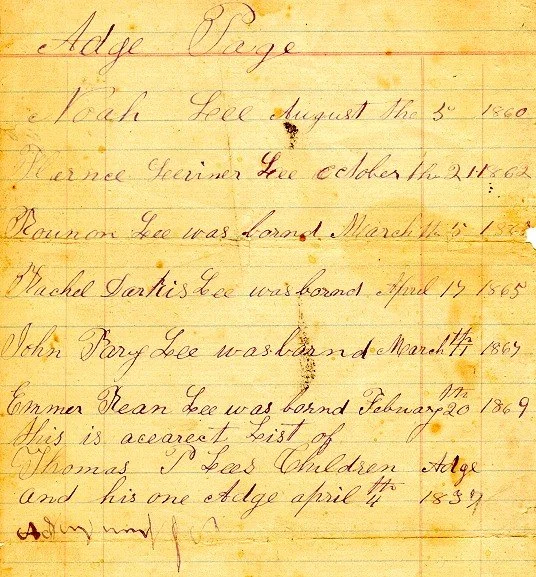
Source Document - Adge Family Births
The note lists several Adge family children with birth dates spanning the 1860s, written in cursive on lined paper. The handwriting includes:
Nonstandard spelling such as “bornd”
Inconsistent capitalization
Repeated use of the word “Adge” in places where modern readers might expect something else
A final line with ink marks that cannot be read with confidence
This is a perfect example of why genealogists should not modernize, interpret, or “clean up” handwriting during transcription.
What Cursive Curator Did Correctly
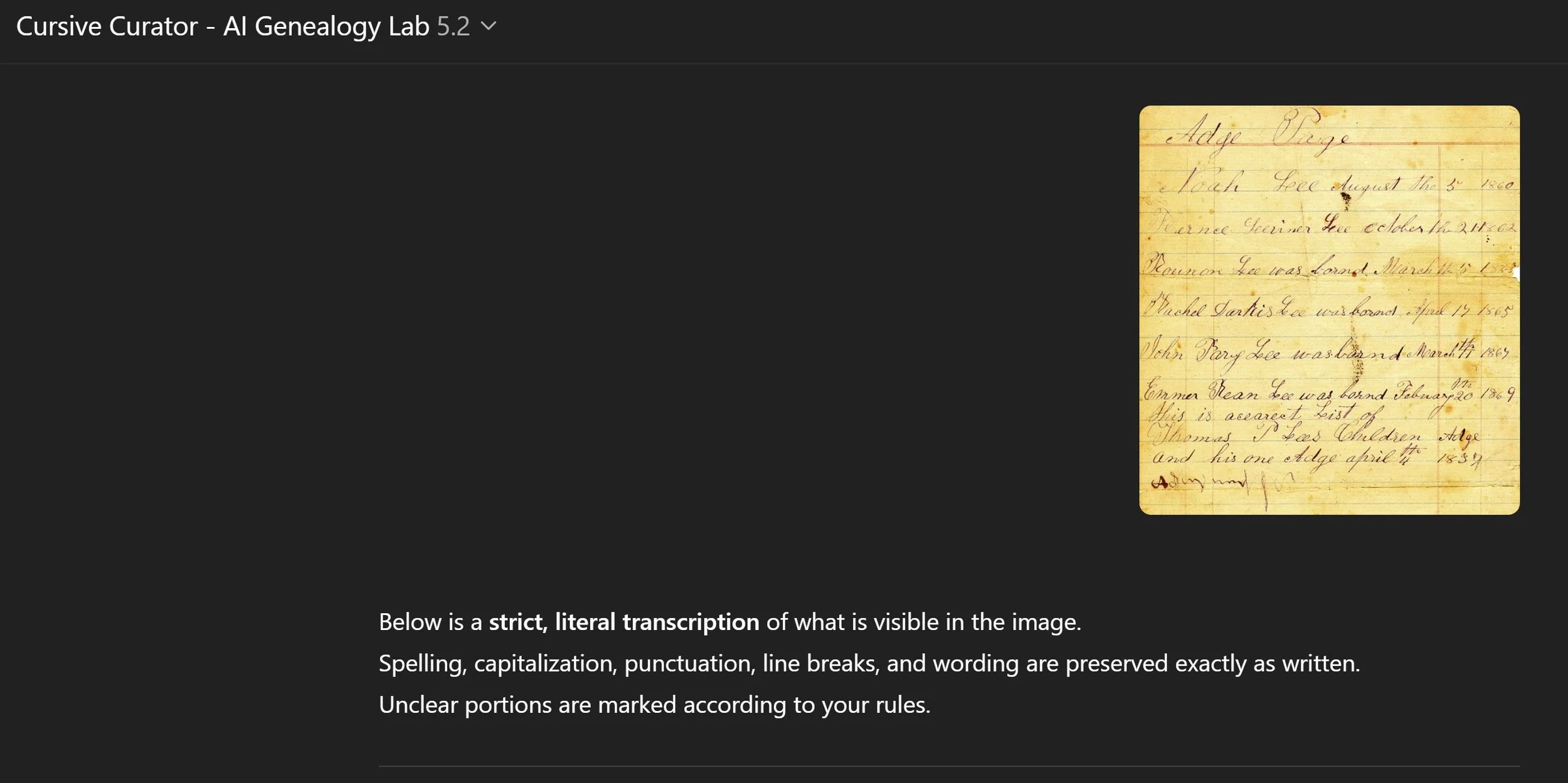
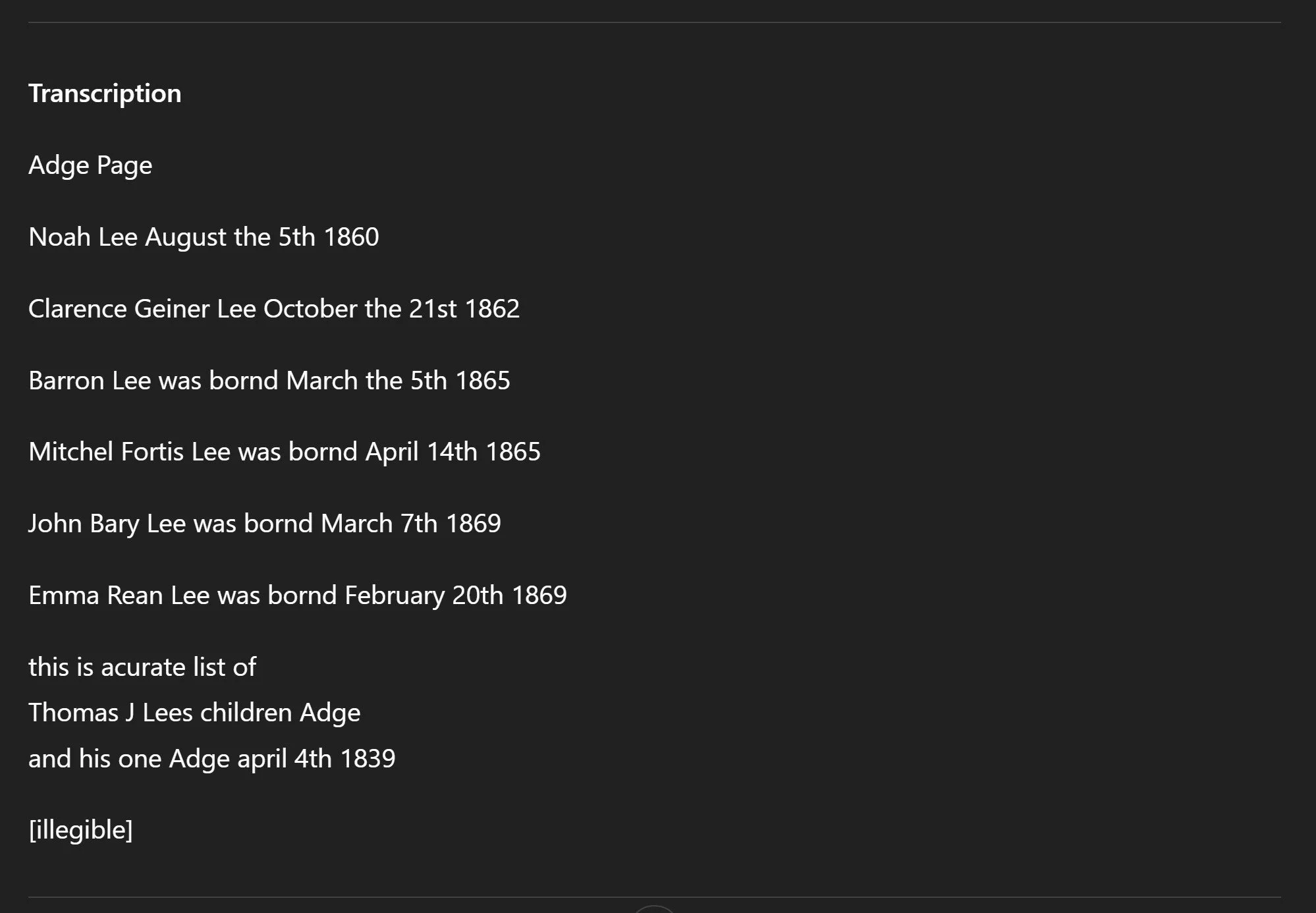
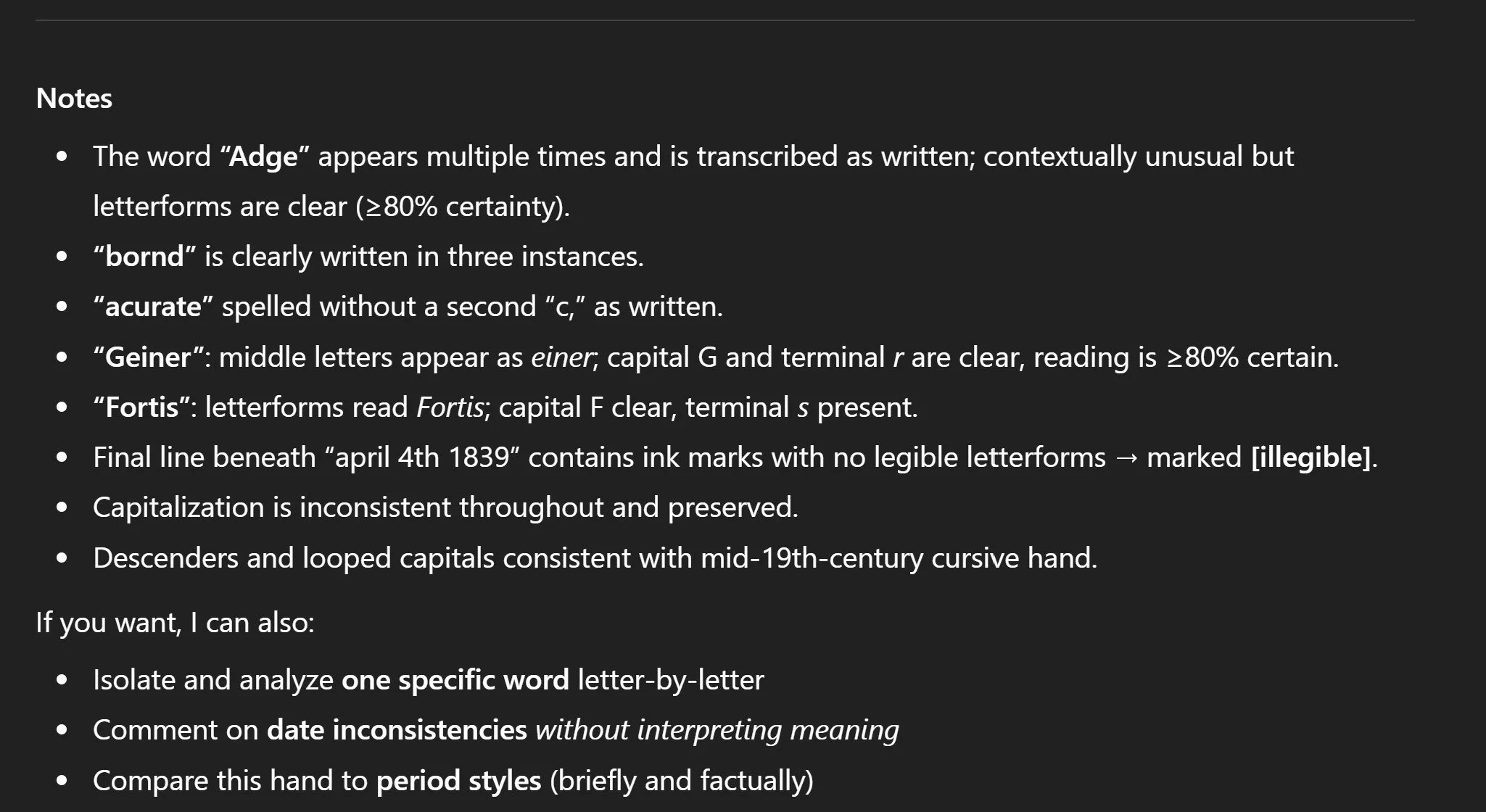
Cursive Curator returned:
A strict, literal transcription of exactly what is visible
Original spelling, capitalization, punctuation, and line breaks preserved
Clear marking of unreadable content using
[illegible]Notes explaining why certain words were transcribed as written, even when unusual
No guesses, no corrections, no inferred meanings
For example, words like “bornd” and “acurate” were transcribed exactly as written, not silently corrected. Names such as Geiner and Fortis were retained because the letterforms supported those readings at a high confidence level.
This is intentional. In genealogy, transcription and interpretation are two different steps.
Why This Matters for Genealogy
When you modernize spelling or “fix” handwriting during transcription, you lose evidence.
That evidence can matter later when you:
Compare handwriting across documents
Identify whether a record is original or copied
Evaluate the education level or habits of the writer
Explain discrepancies between records
A disciplined transcription gives you a stable foundation. Interpretation can come later.
The Prompt Behind Cursive Curator
Cursive Curator works the way it does because of a very strict internal prompt. In short, it is instructed to:
Transcribe only what is clearly visible
Write a word only when at least 80% certain
Never infer or reconstruct missing text
Never modernize spelling or grammar
Mark unclear areas using standardized brackets such as
[illegible],[uncertain], or[partial]Provide a short Notes section explaining ambiguity and handwriting features
It also includes a separate mode for analyzing a single word or letter group without guessing or offering multiple possibilities.
This is not how general AI tools behave by default. It is why a custom approach matters.
What Is a Custom GPT?
A Custom GPT is a specialized version of ChatGPT designed for a specific task.
Instead of being general-purpose, it follows narrowly defined rules, tone, and behavior. In the case of Cursive Curator, it is designed specifically for historical handwriting analysis and transcription, using genealogy-appropriate standards.
Think of it as a focused research assistant, not a creative writer.
Comparing Cursive Curator to Ancestry’s Transcription
For this document, I also ran a direct comparison with Ancestry.com’s automated transcription and included their results alongside the original image and the Cursive Curator output.
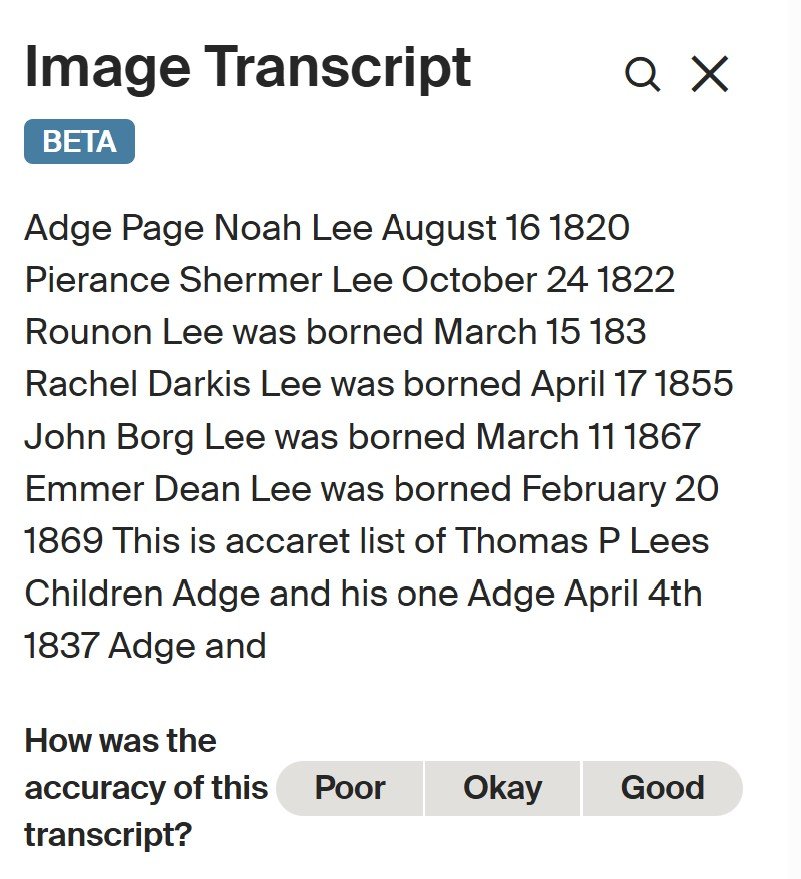
Ancestry.com Transcription
Ancestry’s transcription does a reasonable job of extracting basic content, but it flattens the document. Line structure, spacing, and visual grouping are not preserved, and there is no explanation of where the system was uncertain or why a particular reading was chosen.
By contrast, the Cursive Curator transcription:
Preserves the original layout, line breaks, and visual structure of the document
Retains original spelling and capitalization without correction
Explicitly marks unreadable or uncertain text instead of forcing a guess
Provides notes explaining ambiguous letterforms and handwriting features
This difference matters. In genealogy, knowing where a transcription is uncertain can be just as important as the words themselves. A clean-looking transcription that hides uncertainty can unintentionally introduce errors into later research.
The goal is not to replace Ancestry’s tools, but to show how a stricter, evidence-first transcription approach can complement them when accuracy and documentation matter most.
Trying TryLeo.ai on the Same Document
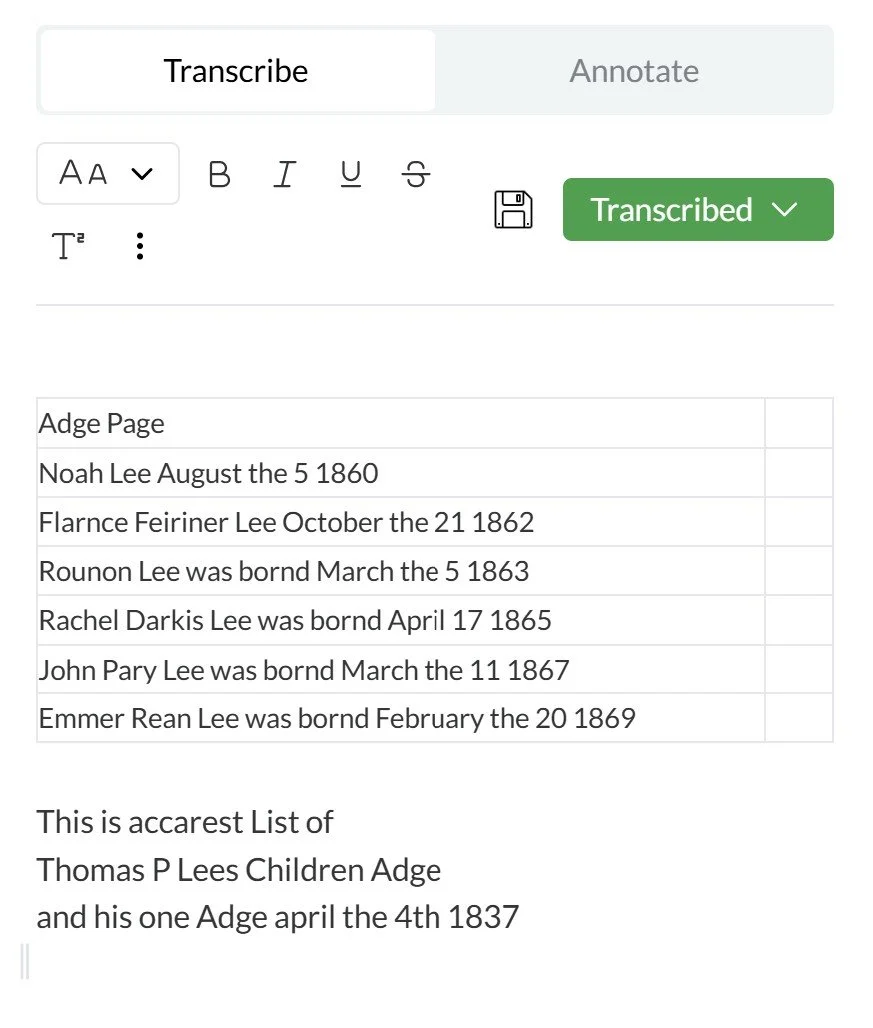
I also ran the same handwritten Adge family note through TryLeo.ai as part of this comparison. Overall, TryLeo did a solid job with this document and produced an accurate, readable transcription. In at least one case, it handled a given name particularly well, correctly reading Emmer (how it is written by hand) where the Cursive Curator transcription rendered Emma, which aligns with the visible letterforms.
The main differences were minor but relevant for evidence-focused genealogical work. Some ordinal endings in dates (such as “th”) were omitted, and the output focused more on readability than on preserving the original layout and line structure of the document. In addition, TryLeo does not include analytical notes explaining confidence, ambiguity, or handwriting features.
Choosing the Right Tool for the Job
There is no single transcription tool that is universally better or worse. What matters is how you want to work and what you want to see in the output.
If you want a quick, convenient transcription directly inside the Ancestry interface you are already using, Ancestry’s built-in tools may be the most practical choice. If you regularly work in ChatGPT, use it throughout the day for research, and want to ask follow-up questions about handwriting, structure, or ambiguity as part of the same workflow, a custom GPT approach may fit better. That interactive analysis is something the other tools do not currently support.
If your goal is to open a separate platform and batch-process large numbers of handwritten documents efficiently, a dedicated transcription service may be the best option.
Each approach serves a different purpose. The key is understanding what the tool is optimized for and choosing the one that supports your research style, documentation needs, and tolerance for uncertainty rather than expecting a single solution to fit every situation.
Try It Yourself
You can have direct access to Cursive Curator in ChatGPT.
You can also explore all of my custom genealogy GPTs, each designed for a specific research task.
If you work with handwritten records regularly, disciplined transcription is one of the most important skills you can develop. Tools should support that discipline, not override it.
