Using ChatGPT to Uncover Hidden Historical Records and Manage Research
My book, The Solomon Gang: Outlaws by Any Name — A True Crime Western, is already published. But as any genealogist knows, research is never really finished! I started wondering whether there might still be undiscovered records sitting in courthouse basements, museum collections, historical societies, or archives that haven't been digitized.
The men I researched operated under several aliases across multiple states, counties, and decades. Jack Solomon, for example, also appeared in records as Jack Copeland and Jack Anderson. With so many names, locations, and dates to investigate, I knew I needed an organized approach.
So I created a ChatGPT Project called Copeland Research Emails and connected it to my Gmail account.
Step 1: Use AI to Find Places You Haven't Looked
I began by giving ChatGPT the names, aliases, dates, locations, and specific events I wanted to investigate. Then I asked it to identify repositories that might hold surviving records.
We worked through county courts, sheriff's offices, state archives, museums, historical societies, libraries, and special collections across Colorado and New Mexico.
But I wanted to go beyond the obvious repositories. I was looking for things like old jail registers, court dockets, coroner's records, sheriff's papers, photographs, unpublished manuscripts, and local-history collections that might never appear in an online search.
One interesting lead involved the 1932 death of Jack Anderson in San Juan County, New Mexico. ChatGPT helped me investigate local repositories, including San Juan College and its historical collections. That correspondence led to a referral to the Totah Tracers Genealogical Collection at Salmon Ruins, a collection I might otherwise have overlooked.
Another referral led to the Bolack Museum, which reportedly had artifacts associated with Sheriff John Graves, the sheriff involved in Anderson's death. That was an intriguing possibility, although further investigation did not establish a relevant Anderson artifact.
These aren't necessarily discoveries of new historical evidence. They're discoveries of places where evidence might survive, and that's an important distinction.
Step 2: Have ChatGPT Help Write the Emails
Once I identified a potential repository, I used ChatGPT to help draft a targeted records request.
Rather than sending a generic "Do you have anything about Jack Solomon?" email, I could provide the specific person, aliases, event, approximate dates, and types of records I was seeking.
For example, when researching a possible appearance of Jack under the name Jack Rogers in the 1930 census, I asked ChatGPT to help contact the Raton Museum about possible Vermejo Park ranch employment records, payrolls, photographs, correspondence, and other local material.
I reviewed and sent the emails myself. ChatGPT helped make the requests specific enough that an archivist or volunteer would know what to look for.
Step 3: Connect Gmail and Track Everything
This is where the workflow became especially useful.
Because ChatGPT has permission to read my Gmail, I can ask it to review the emails I've sent, identify responses, and update my research spreadsheet.
My tracker includes the state, county, organization, record type, individuals being researched, relevant dates, response received, and whether follow-up is needed.
I also use color coding to distinguish pending requests, completed searches, negative results, and follow-ups.
Instead of digging through dozens of email conversations, I can ask:
"Check my latest emails and update the tracker."
"Which organizations haven't responded?"
"Which requests need follow-up?"
"Did anyone refer me to another archive?"
"Add the new records requests I just sent."
The spreadsheet becomes a central record of the investigation, not just a list of email addresses.
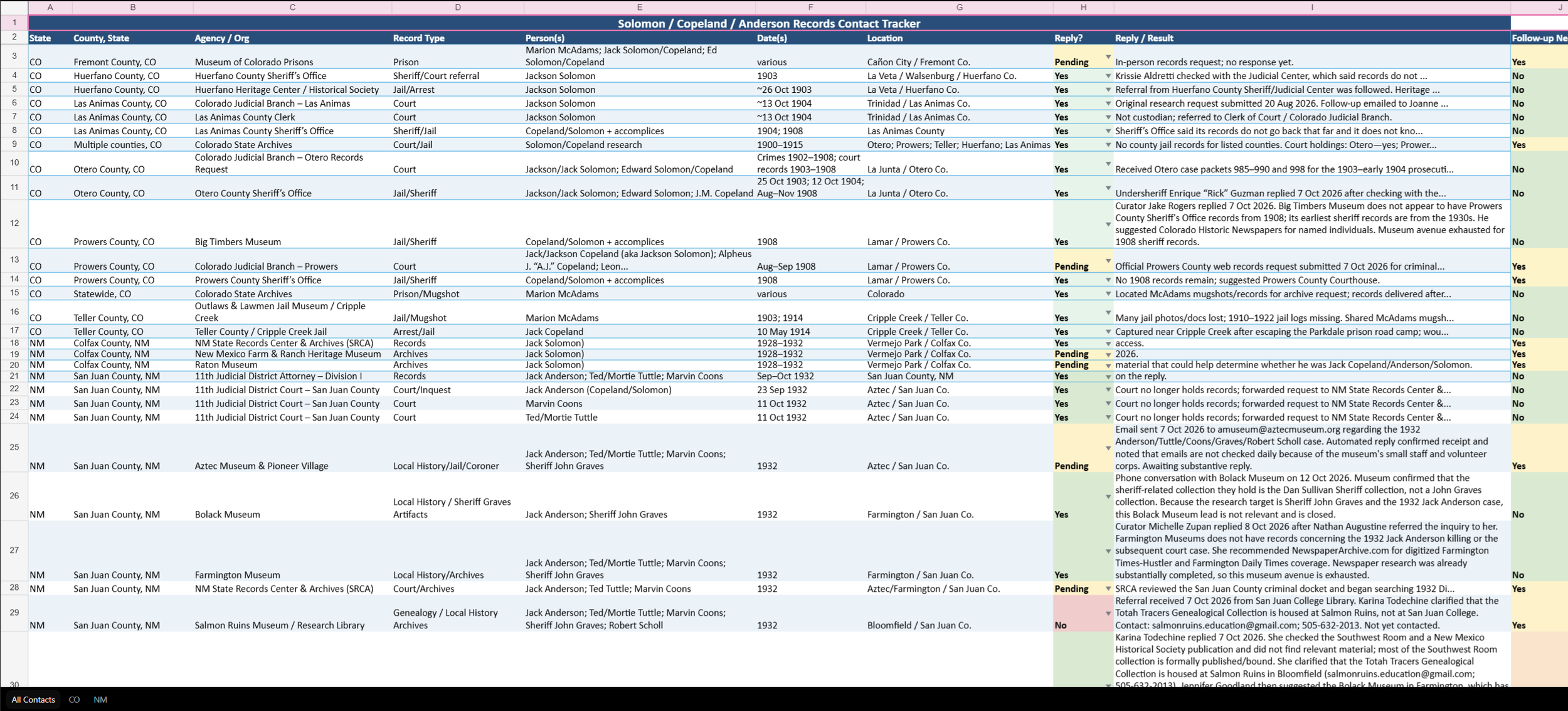
This tracker covers research across multiple Colorado and New Mexico counties, with more than 50 contacts and research leads in various stages. ChatGPT helps me keep track of responses, referrals, unsuccessful searches, and outstanding requests without losing the history of each conversation.
Step 4: Follow the Referrals
Some of the most useful responses aren't actual records. They're referrals.
For example, Colorado inquiries led me between county offices, the Colorado State Archives, and local heritage organizations as I tried to determine who might hold surviving early-1900s jail and court records.
In New Mexico, librarians and museum staff suggested other institutions and collections worth contacting. When an archive reported that it couldn't locate a record, I could ask ChatGPT what alternative record series or repositories might be worth investigating.
The AI isn't accessing hidden collections itself. It's helping me locate potential sources, ask more informed questions, and systematically follow the leads that people provide.
The Bigger Picture
ChatGPT doesn't replace an archivist, and it certainly doesn't guarantee that an old record still exists. I verify contact information, review the original correspondence, and distinguish confirmed findings from possible leads.
But it has changed how I manage a large research project. I'm using AI throughout the process: identifying repositories, drafting requests, reading responses, tracking progress, and deciding where to look next.
For a published book that I thought was largely finished, this has opened up another round of research possibilities. Sometimes the next clue isn't hiding in a genealogy database. It's sitting in a small museum, an unpublished collection, or a box of records that someone hasn't looked through in decades.
