Using ChatGPT to Track Genealogy Research Emails and Record Requests
In my previous post about Canadian citizenship by descent, I explained how I created a ChatGPT Project to help navigate the application process. But I've also been using ChatGPT for something equally practical: keeping track of all the emails I've sent requesting historical records.
For my Canadian citizenship application, I'm documenting a family line stretching back six generations. This involves tracking down birth certificates, baptismal records, and other evidence from the 1800s. That means contacting churches, archives, county clerks, and government offices, sometimes with several requests outstanding at once.
Keeping track of who I contacted, when, and what they said can become a research project of its own!
Step 1: Connect Gmail to ChatGPT
One of ChatGPT's more useful features is its ability to work with connected applications, including Gmail. Once connected, ChatGPT can search and read relevant emails, including sent messages and replies, without requiring you to copy and paste every conversation.
The easiest way to get started is simply to ask ChatGPT! Open a chat and say, "I want to connect my Gmail account so you can help me track my genealogy research emails." ChatGPT can guide you through the connection process.
Alternatively, you can connect Gmail manually:
Open ChatGPT → Settings → Plugins.
Find Gmail and select the option to connect it.
Sign in to your Google account and review the requested permissions.
Return to your genealogy Project and start asking ChatGPT questions about your correspondence.
You generally only need to connect Gmail once. After that, you can use the connection within your ChatGPT Projects whenever you need to review correspondence, check for replies, or update your research tracker, provided the connection remains active.
For my own research, I use ChatGPT to read and organize emails, not to send them. I prefer to review and send correspondence myself.
Step 2: Ask ChatGPT to Review Your Research Emails
For example, I've been researching Luther Darius Hobbs, born around 1863 in Michigan, and his biological father, Terry Martin, whose baptismal record dates to 1836.
I've emailed a parish requesting confirmation of Terry's baptism and contacted St. Clair County, Michigan, asking about possible delayed birth records for Luther. If no birth registration exists, I also want written confirmation of that unsuccessful search.
Instead of searching through my email manually, I can ask ChatGPT:
"Find all emails I've sent about Luther Hobbs's birth records."
"Have I received a response about Terry Martin's baptism?"
"Which record requests are still pending?"
"Who should I follow up with?"
ChatGPT can review matching email threads, identify the dates and recipients, summarize responses, and flag requests that appear unanswered. I can then verify the findings against the original messages.
Step 3: Turn the Emails into a Research Tracker
This is my favorite part. Rather than simply summarizing emails, I ask ChatGPT to organize everything into a spreadsheet.
My tracker includes the organization contacted, email address, date sent, records requested, response received, status, and next action. I can have ChatGPT categorize requests as Pending, Completed, No Records Found, or Follow-Up Needed.
As responses arrive, I can return to the Project and ask:
"Check my latest emails relating to the Canadian citizenship research and update my records-request spreadsheet. Identify new responses, update statuses, and flag anything requiring follow-up."
This turns a collection of scattered email conversations into an organized research log. It also helps me avoid contacting the same repository twice or forgetting about a request I sent weeks earlier.
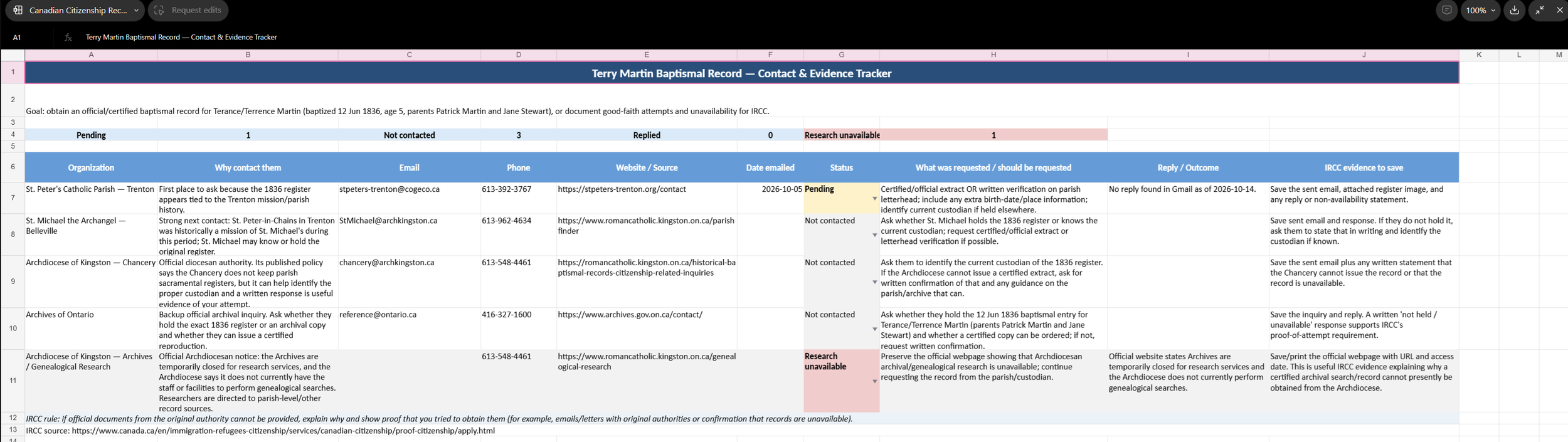
This is one of my smaller research trackers, but I have another genealogy project involving more than 50 email conversations, all in various stages of research, responses, and follow-ups. That's where having ChatGPT help manage and update a tracker really becomes valuable. Keeping track of that many requests manually would be quite a challenge!
Step 4: Keep the Research Moving
ChatGPT can also help draft follow-up emails, suggest additional repositories when a search is unsuccessful, and identify missing documentation based on the responses received.
There are limits, of course. ChatGPT only has access to information available through the connected account, and I still check the original emails for accuracy. A request with no reply found isn't necessarily proof that nobody responded, particularly if the search was incomplete.
For me, the biggest benefit is organization. ChatGPT isn't just helping me research my ancestors; it's helping me manage the research process itself. And when you're dealing with missing 19th-century records, multiple archives, and government documentation requirements, that can save a considerable amount of time.
